
Unofficial Windows-first UI for OpenAI Codex.
Run the official Codex agent in a browser UI on desktop, from phone, or alongside terminal workflows.

Install and launch
Recommended path is MSI install from the latest GitHub release. ZIP install remains available as a portable fallback. Ensure Codex CLI is installed and authenticated before any install flow.
codex --version
codex loginDownload latest .msi from GitHub releases
Run installer
Open a new terminalpwsh -ExecutionPolicy Bypass -File .\install.ps1buffaly-codex-webCommands after install
buffaly-codex-webbuffaly-codexbuffaly-codex run --prompt "Refactor payment service and add tests" --cwd "C:\Projects\MyApp"buffaly-codex-updatebuffaly-codex-uninstallFeature tour
These sections map directly to major workflows described in the project README and release notes.
Multi-project and multi-session management
Keep many sessions visible by working directory and session, instead of juggling terminal tabs.
- Sidebar groups active projects and sessions with status visibility.
- CLI-started sessions appear in the web UI with timeline context.
- Desktop and mobile both keep the same session model.


Prompting that feels native
Use normal browser editing, voice dictation, and image paste workflows while keeping Codex controls nearby.
- Natural input, copy/paste, and edit before send.
- Image attachments are visible and sent as prompt context.
- Dictation support accelerates prompt entry.


Persistent timeline and long-session review
Resume old work quickly with readable history, recap workflows, and diff-style previews.
- Timeline keeps assistant and tool activity in one place.
- Recap mode supports end-of-day review and export workflows.
- Diff preview and collapsed sections reduce noise in long runs.


Hybrid web plus CLI workflow
Use browser context and review while running focused terminal commands against the same sessions.
- Web and CLI stay aligned on the same active workflow.
- Switch between quick command execution and rich timeline review.
- Designed for mixed deep work and fast tasks.


Operational visibility and reliability
Inspect live state and recover from edge cases when running many sessions.
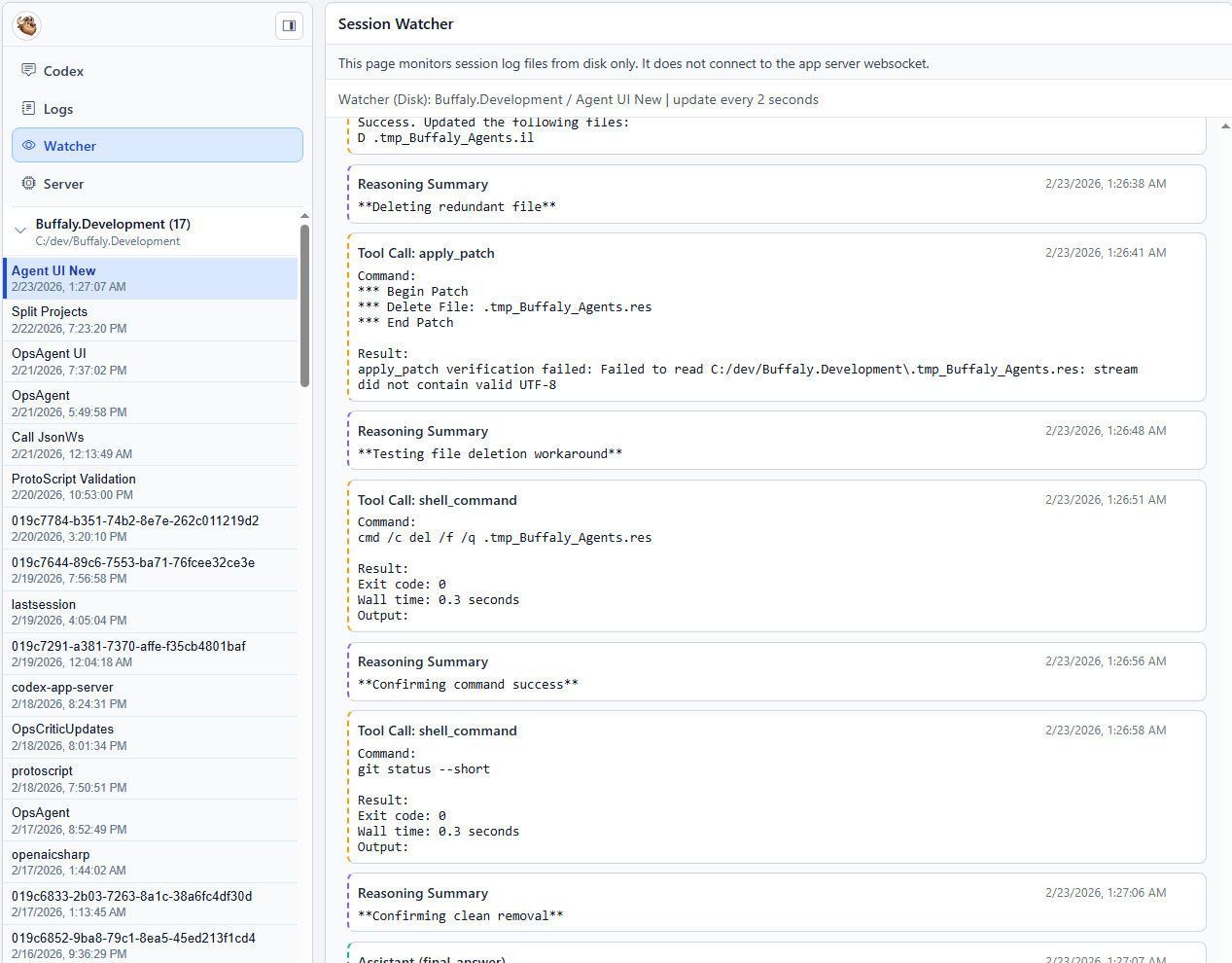
- Realtime logs and watcher views for protocol-level diagnostics.
- Server state view exposes runtime snapshots.
- Recent releases improve cancel recovery, stale turn handling, and attach consistency.



Why this over raw CLI?
| Raw CLI friction | Buffaly.CodexEmbedded workflow |
|---|---|
| One terminal session at a time | Juggle multiple projects with persistent sessions side-by-side. |
| Clunky arrow-key editing | Use browser-native input with full edit, copy/paste, and undo. |
| Image workflows are painful | Paste screenshots directly into prompts. |
| History lost in scrollback | Use per-session timelines and recap views. |
| Device switching resets context | Continue the same session from desktop, CLI, and phone. |
Mobile and Tailscale
Cross-device continuation is designed around private tailnet access. Keep local server private and publish only through Tailscale Serve.
tailscale serve --bg 5173
tailscale serve status
On device clients where host resolution fails, run: tailscale set --accept-dns=true
Security
Codex can read, write, and execute code on your machine. Keep deployment private and explicit.
- Bind to localhost (127.0.0.1) by default.
- Do not expose the UI directly to the public internet.
- Publish privately via Tailscale Serve when remote access is needed.
- Use auth token protected WebSocket connections.
- Avoid running on machines with secrets you are unwilling to expose to tool-driven workflows.
Configuration after install
Installer updates preserve existing `appsettings.json` files. Most teams edit these paths and keys first:
Config paths
%LOCALAPPDATA%\Buffaly.CodexEmbedded\versions\<active-version>\apps\cli\appsettings.json%LOCALAPPDATA%\Buffaly.CodexEmbedded\versions\<active-version>\apps\web\appsettings.json
Common keys
- CodexPath
- DefaultCwd
- TimeoutSeconds / TurnTimeoutSeconds
- LogFilePath / LogRootPath
Troubleshooting
Latest release
- Planning Mode end-to-end support (stream, review, approve, continue).
- Voice dictation for fast prompt entry.
- Recap workflow for end-of-day reports and exports.
- Diff-style timeline preview and long-session review improvements.
- Multi-session recovery and attach reliability improvements.
Embed in .NET apps
The repo includes `Buffaly.CodexEmbedded.Core` for embedding Codex sessions via JSON-RPC over JSONL in your own .NET hosts.
Open external core API guideFeedback
Ideas, bug reports, workflow feedback, and patches are welcome. Include what you tried, what happened, and what you expected.