
Buffaly Builds Its Own Tools
How an executable graph breaks the static toolbox by creating, activating, and using new capabilities while work is still in progress.
Most tool-using AI agents suffer from a static ceiling. They start with a fixed toolbox. They can choose from functions their developer explicitly registered, but when they encounter a novel problem, they cannot invent a new tool to solve it. The action set is fundamentally static.
Buffaly is built around a different architecture: the agent's environment is a typed executable graph. A tool is just one kind of node in that graph. A workflow, a data object, a prompt, a compiled helper, and a scope rule can also be graph nodes. Because the graph is typed, Buffaly can search it by meaning, but it can also traverse it by kind, relationship, parent, child, or exact name. Because the graph is executable, Buffaly can extend it while work is in progress.
That is the central claim: Buffaly does not merely call tools. It creates new tools, activates the new capabilities in the executable graph, and then uses them in the same ongoing body of work.
This is not a theoretical capability. It is happening in real usage.
To prove this, I analyzed 1.2 million messages and over 380,000 tool calls from a real-world Buffaly instance. The telemetry shows the system isn't just generating dead code. It is actively identifying gaps, authoring new capabilities to fill them, activating those capabilities in its graph, and using the new tools immediately.
Out of hundreds of dynamic graph mutations, 70% of the newly created tools were used in the exact same session they were written. This means these tools were created to solve an immediate problem, proving Buffaly's ability to overcome roadblocks by building its own ad hoc tools on the fly.
This is the failure mode the design was built to catch: an agent blocked by a missing capability should be able to build that capability and keep going.
A tool is a typed node in an executable graph
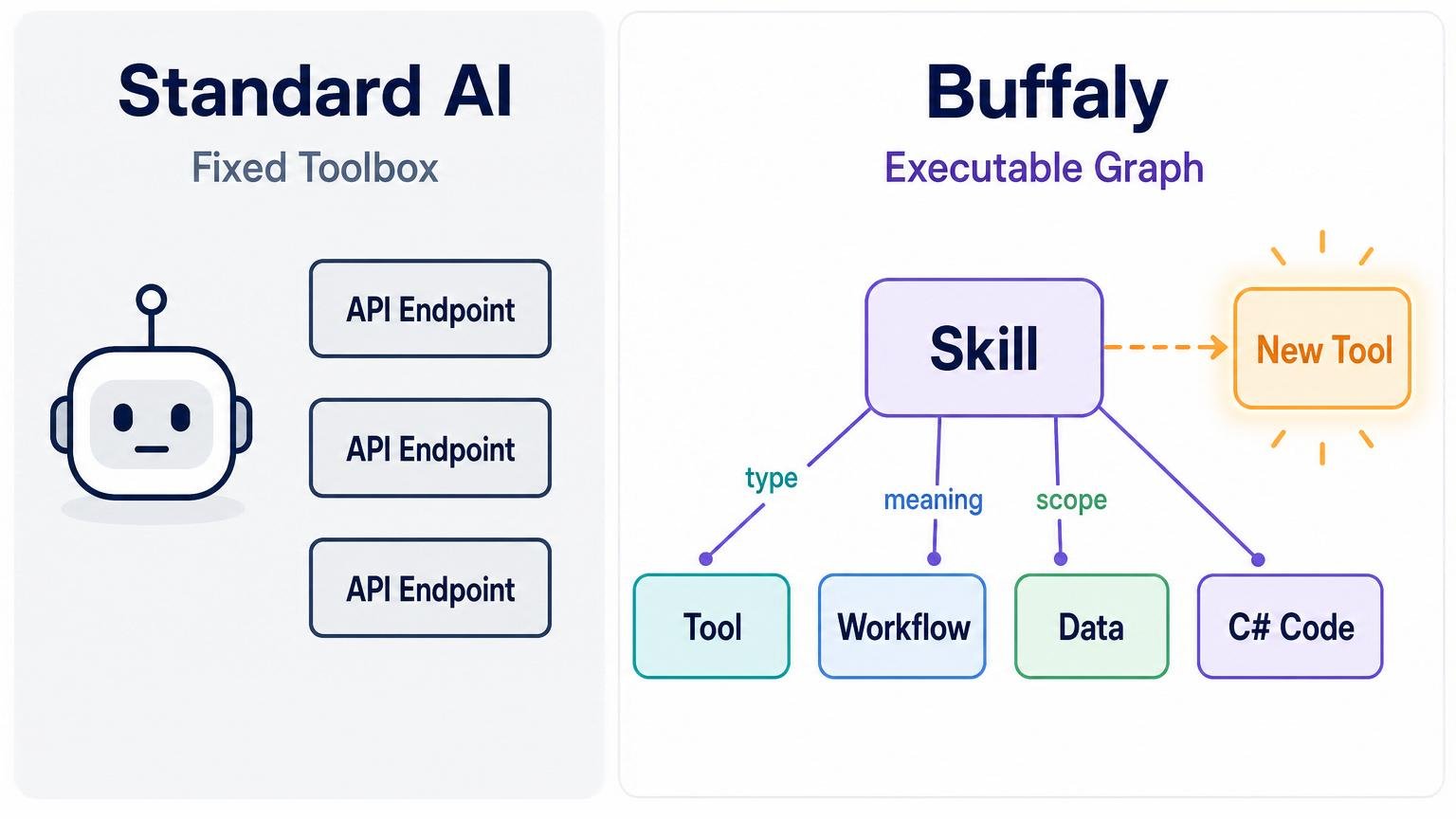
Static agents choose from a flat toolbox. Buffaly navigates and extends a typed executable graph.
In Buffaly, a tool is not just an API endpoint. It is a typed capability represented in the system's executable graph.
The deeper point is that Buffaly is not a text-only agent with a bag of external functions. It runs on native execution. Its environment is described in ProtoScript, a language built so the environment can represent itself, compile executable graph changes, and reprogram parts of its own tool surface on the fly.
That means a tool is more than a label plus a JSON schema. It can carry a natural-language purpose, typed parameters, result-rendering expectations, implementation rules, and executable behavior. Some tools are direct operations. Some are reusable procedures. Some wrap compiled C# code. Some are behavior overlays that change how the agent works in a context.
For a new reader, the useful mental model is simple: Buffaly's "tools" include both functions and workflows. A function might read a file, compile a project, query a database, or transform data. A workflow might guide the agent through onboarding, local task management, or a specialized troubleshooting procedure. Both can be represented as nodes in the same graph and discovered when needed.
Those capabilities live in the same graph as skills, entities, action roots, prompt definitions, semantic phrases, and runtime scope rules. That matters because discovery is not limited to searching a flat list of functions.
Buffaly can ask: what action best matches this intent? But it can also ask: what descendants does this action root have? What tools belong to this skill? What prototypes inherit this parent? What entity is this tool meant to operate on? What tools are already loaded? What tools are installed but not loaded? What prompt actions exist for this workflow family?
The result is progressive discovery over an extensible typed graph. Semantic search is one access path. Traversing the graph by type, parent, child, relationship, tool family, or runtime status is another. As the graph grows, the discovery surface grows with it.
Buffaly does not merely retrieve tools. It navigates a living executable environment.
How Buffaly creates new tools
Buffaly extends the graph by authoring new graph nodes. Some of those nodes are memories or entities. Others are executable capabilities.
The most direct path is a ProtoScript tool. A small ProtoScript declaration gives the tool a name, a family, a description of what it does, typed inputs, and executable code.
A simplified shape looks like this:
[SemanticProgram.InfinitivePhrase("to do something useful")]
prototype ToDoSomethingUseful : SomeSkillAction
{
    Description = "input - typed input used by the action.";

    function Execute(string input) : string
    {
        // implementation
    }
}
The declaration is both graph structure and executable code. It gives the environment a new typed node and gives the runtime something it can expose as a callable tool.
Buffaly has internal authoring actions to handle this. When the agent defines a new prototype, the system parses it, writes it into the active project, and inserts it into the graph.
Because the graph is flexible, this single authoring mechanism can create many different things: a new executable tool, a prompt-guided workflow, a base data type, or a new routing skill.
Not every useful tool is a direct function. Some capabilities are repeatable procedures: review this codebase, maintain a local task, onboard a user, troubleshoot a deployment, perform a safe release, or follow a domain-specific workflow.
Buffaly represents these as prompt-backed tools. A prompt workflow usually has two parts: a graph node that makes the workflow discoverable and a markdown prompt file containing the procedure. These can be discovered and called like other tools, but what they execute is reusable guidance rather than a single imperative function body.
This is how the graph contains both functions and procedures.
ProtoScript is not the only implementation layer. Buffaly can also load compiled .NET code and expose it through ProtoScript wrappers. Complex IO, service clients, binary integrations, data transformations, and performance-sensitive code often belong in C#. Buffaly can import DLLs into a skill, add references/imports, and expose typed wrapper tools over the compiled implementation.
The concrete authoring surface also includes workflows for importing DLLs, installing compiled capabilities into a tool family, and creating new compiled capabilities from scratch. Those compiled-code paths are a next-pass attribution target for per-tool provenance, but they are already visible in the session database as part of Buffaly's tool-creation machinery.
That gives the system an escape hatch from prompt-only or script-only behavior. It can synthesize procedural tools, script tools, and compiled-code-backed tools.
The retained database shows these authoring paths in use. One pass analyzed 1,010 authoring rows, including 734 prototype insert/update calls, 156 prompt-workflow artifact calls, and 89 DLL/external-code workflow calls across the tracked authoring tools. That is why the article treats tool creation as a system behavior rather than a rare manual event.
The local data also shows direct ProtoScript file changes, generated files, and broader project edits. They still matter: once compiled and loaded, they become part of the executable graph.
Concrete Examples in Practice
What does this look like in an actual session? Here are three real patterns where dynamic tool creation breaks the static ceiling:
1. The Missing Parser
What was happening: An agent is tasked with debugging a system failure and encounters a legacy, undocumented application log format.
What usually goes wrong: A traditional agent halts. It lacks a tool to read the proprietary format and asks the human to extract the data.
What Buffaly caught and did: Instead of stopping, Buffaly authored a custom string-parsing tool, loaded it into the graph, and parsed the logs into a structured native DataTable.
Why it matters: It converted an unreadable artifact into queryable evidence and solved the root issue without human intervention.
2. The Domain-Specific Routine
What was happening: An agent successfully stepped through a complex, manual troubleshooting process for a failed staging deployment.
What usually goes wrong: That hard-won operational knowledge evaporates when the session ends. The next time it happens, the agent starts from scratch.
What Buffaly caught and did: Recognizing a repeatable workflow, the agent authored a new Prompt Action—a reusable procedure—encapsulating the exact diagnostic steps.
Why it matters: The agent taught itself a new workflow. Future sessions can now natively discover and execute the TroubleshootStagingDeployment action.
3. The API Escape Hatch
What was happening: The agent needed to extract specific telemetry from a subsystem, but the standard reporting tools didn't expose the required fields.
What usually goes wrong: The agent falls back to generic, high-risk command-line scripting or gives up.
What Buffaly caught and did: Buffaly imported a compiled C# telemetry library, wrote a typed ProtoScript wrapper over the exact method needed, and exposed it as a new, safe tool.
Why it matters: It bypassed a limitation safely by synthesizing a structured, typed capability rather than relying on brittle shell scripts.
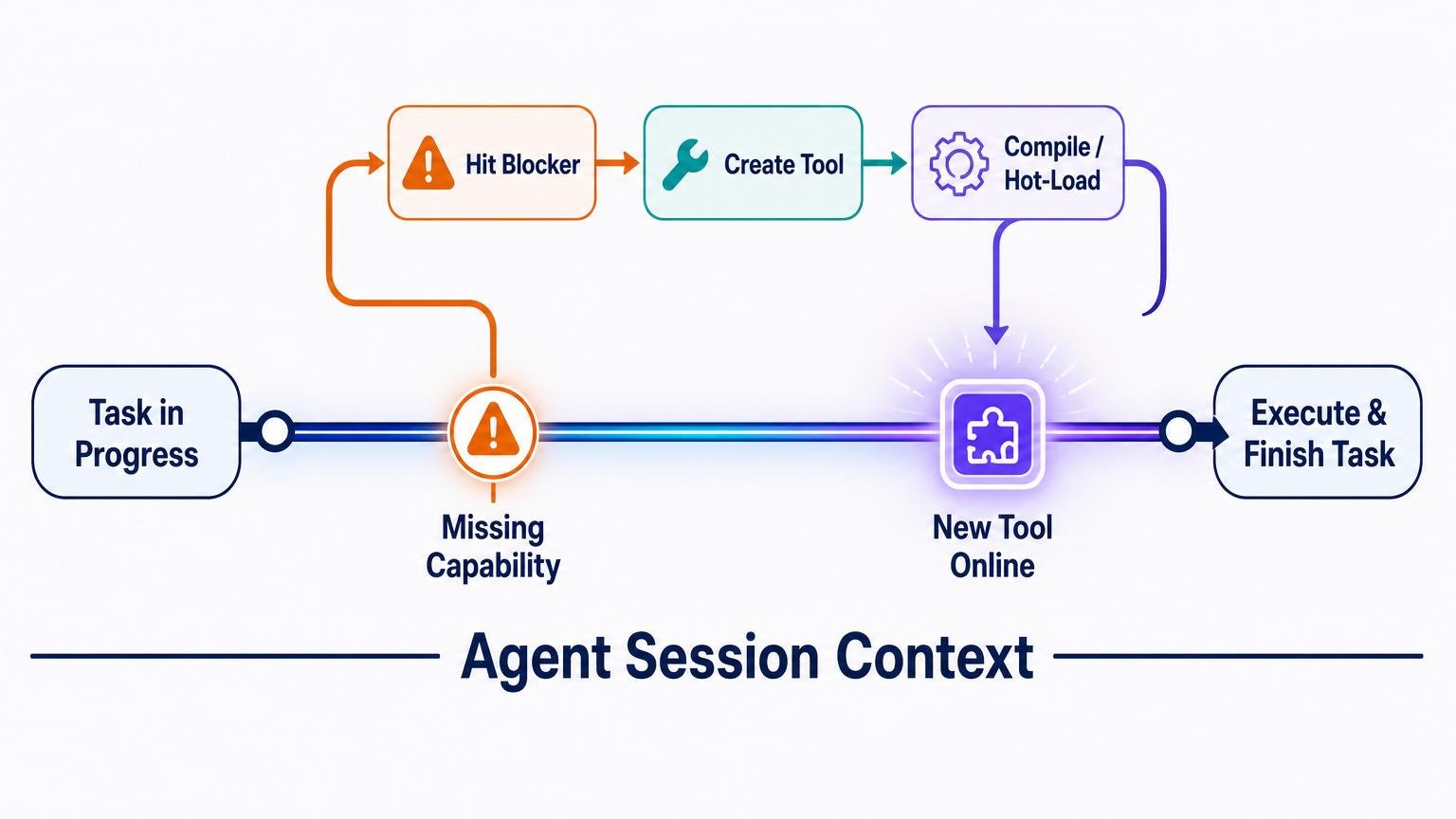
Buffaly can hit a blocker, create a missing tool, hot-load it, and keep working in the same session.
Hot-swapping the graph
Creating a graph node is not enough. The new capability has to become available to the running agent.
Buffaly handles activation without restarting the entire agent. A specific action can be loaded into a session, while larger graph changes can refresh the executable graph so newly authored tools, prompt workflows, imports, or wrappers become discoverable and callable.
The source evidence matches the runtime behavior. Candidate tools can be already loaded, automatically loaded, or marked as requiring a manual load. A registrar projects executable graph nodes into callable runtime tools, including descriptions and parameter schemas. In short: the function-tool surface is projected from the executable graph.
Agent profiles scope that projection. A profile defines the root action and root entity types that an agent is allowed to see. Other profiles can expose a narrower surface, such as watcher sessions. This is how the graph can be larger than any one agent's visible toolbox.
This is where the architecture becomes more than a static ontology. It is an executable graph that can be updated and activated.
That does not mean the entire system has to stop. Because Buffaly uses a distributed runtime model, workers can be recycled or rehydrated while the broader session and ecosystem continue. In practical terms, the agent changes the graph, brings the new graph state online, and continues the task with the new capabilities available.
The operational point is simple: graph edits do not stay inert. They become callable capabilities that the agent can use to continue the work.
Discovery is graph navigation, not just search
Buffaly can find tools in several ways.
It can use semantic search over action descriptions. It can list tool families and the tools inside them. It can inspect installed runtime capabilities. It can bind target entities separately from actions. It can walk descendants, inspect parents, and use scoped roots. It can ask what is already loaded. It can load a candidate tool when needed.
The user-facing discovery tools make those paths explicit. One search path finds candidate actions by operational meaning and reports whether they are loaded. Another searches separately for target objects, accounts, repositories, projects, environments, or other entities. Listing and prototype-inspection tools expose the graph-structured side of discovery.
The catalog code backs this up. It builds tool families, resolves each family's root, finds executable descendants, finds prompt-backed workflows, and extracts human-readable action phrases for display and discovery. This is graph navigation plus semantic retrieval, not a single flat search index.
The master prompt turns that architecture into operating policy: bind to ontology first, prefer typed domain actions over shell, search candidate actions with multiple phrasings when the route is unclear, search candidate entities separately, use skill/action listing as secondary discovery, and only ask a clarifying question after tool-assisted discovery fails.
These mechanisms compose. A user request might begin as a semantic phrase, resolve to an action candidate, bind to an entity, inspect the skill tree, load a tool, and then execute it. If the right tool does not exist yet, the same graph can be extended.
That makes discovery progressive in two senses: the agent progressively resolves intent into a typed tool call, and the graph itself can progressively grow new tool nodes over time.
Execution and persistence
Once a tool is loaded, the runtime exposes it as a callable function tool. The agent emits a tool call. The runtime dispatches that call to the appropriate implementation.
For a ProtoScript tool, dispatch enters the Execute(...) function. That function may call other ProtoScript helpers, C# imports, JSON web services, process wrappers, database helpers, or other tools.
For an OpsAction, execution is backed by runtime or host code. For a C# backed tool, a ProtoScript wrapper may dispatch into an imported assembly. For a prompt action, the execution is a reusable prompt-guided workflow rather than a simple code body.
That implementation split is intentional. ProtoScript is the graph-native declaration and glue layer: it names the capability, places it in the hierarchy, attaches semantic phrases, declares typed parameters, and exposes Execute(...). C# is the heavier implementation layer for validation, IO, service clients, indexing, transformations, and other behavior that should not live in a .pts wrapper. DLL-backed workflows extend the same pattern to compiled capabilities created or imported at runtime.
Tool results are not just raw text. They can be large values handled through StringRef, or structured UI envelopes containing metadata formats, result types, and payloads so the UI can render specialized outputs natively. The contract is typed and fail-fast: tools prefer typed parameters and explicit diagnostics over silent normalization.
Crucially, every tool call and result is persisted. The session database records tool-call rows and tool-result rows, tracking arguments, timestamps, turn identifiers, and sequence numbers. This durable memory is exactly why we can reconstruct the agent's tool-creation behavior from local telemetry.
Prompt actions are tools too, but a different kind
A direct executable tool performs an operation. Read a file. Query a database. Compile a project. Call a service. Transform a table. Search a folder.
A prompt action performs a procedure. It gives the agent a reusable operating mode or workflow. It might tell the agent how to maintain a local task artifact, onboard a user, review commits, troubleshoot a deployment, or follow a domain-specific playbook.
The session itself used examples of this pattern: LocalTaskPromptAction provides the durable local-task workflow, and OnboardingPromptAction provides guided onboarding behavior. They are called like tools, but their job is to load procedural guidance that changes how the agent performs a multi-step task.
Both are tools in the graph, but they occupy different parts of the capability spectrum.
That distinction is important because Buffaly is not only extending a function library. It is also extending its procedural memory. It can add a new command-like action and it can add a new way of working.
Context prompts are different again. A ContextPrompt is a situational behavior overlay. It is not the work product, and it is not the same as a direct executable tool. It shapes how the agent should behave in a context, such as coding, onboarding, or a specialized workflow.
Constraints keep graph extension from becoming chaos
A self-extending tool graph needs constraints.
Buffaly uses several layers:
- agent profiles define root action and entity scopes;
- skills group related capabilities;
- action roots constrain families of tools;
- typed parameters constrain calls;
- source and runtime paths are scoped;
- secrets are handled separately from ordinary ontology facts;
- prompt guidance prefers typed authoring tools over direct
.ptsedits; - compile and activation checks validate the graph before use;
- Plan, Scratch, and durable task artifacts preserve working state;
- non-destructive defaults reduce accidental damage.
The master prompt also constrains decision-making: use ontology binding before freeform guessing, prefer typed tools, use ToSearchCandidateActions and ToSearchCandidateEntities before asking for clarification, and pass through the strict Question Gate only when ambiguity is real, consequential, and not resolvable with available tools.
The same mechanism that creates tools also creates normal ontology objects, prompt actions, memories, and project facts. So analysis has to classify changes carefully. A prototype insertion is not automatically a new tool. It might be a remembered environment, a Visual Studio project, a database entity, an action root, or a prompt action.
That is why the article distinguishes callable tools from ordinary ontology objects and other graph mutations.
The Data: Active Tool Creation
The runtime catalog reveals how much the executable graph has grown in practice.
The baseline source repository started with a few hundred core capabilities. Today, the active runtime instance has accumulated over 1,600 active prototype declarations across nearly 200 .pts files. It currently offers 744 tool-like capabilities (610 executable tools and 134 prompt actions).
These capabilities are a dynamic mix of ProtoScript functions, procedural prompt workflows, and compiled C# code wrappers, all authored by the agent and surfaced through typed discovery and execution paths. The retained database records 695 distinct tool names actually being called in production.
The operating pattern is straightforward: Buffaly encounters a gap, authors a capability, registers it as a callable node, and uses that new capability to keep working. The retained telemetry shows newly created callable tools and prompt actions becoming operational rather than sitting as dead definitions.
Design conclusions
Several design conclusions fall out of this.
First, tool creation is not a side feature. It is an essential capability. If the agent can only call a fixed toolbox, it is bounded by whatever its developer anticipated. If the agent can extend the executable graph, it can adapt its action vocabulary to new domains, new workflows, and new integrations.
Second, the graph model matters. Semantic search alone would not be enough. Buffaly can search by meaning, but it can also inspect type, parent, descendant, skill, action root, entity relationship, and runtime load state. That is what makes discovery progressive over an extensible graph rather than lookup over a static list.
Third, prompt skills and executable tools are complementary. Some capabilities are best expressed as direct typed functions. Others are best expressed as reusable procedures. A mature agent needs both.
Fourth, ProtoScript gives the system an incremental extension layer. It is close enough to the ontology to describe capabilities as graph nodes, but executable enough to run real work. C# and DLL integration then provide a path to heavier compiled implementations.
Fifth, persistence matters. Because tool calls, results, turn IDs, sequence numbers, and timestamps are stored, the system's evolution can be measured. The database does not just record conversation history. It records the growth of the executable graph.
The Limit of the Static Ceiling
While this data reflects a specific observational window—and does not capture the creation history of every legacy tool—the operational pattern is undeniable.
When we compare the baseline source repository to the active runtime project, the active graph has accumulated nearly double the files and over 1,000 additional prototype declarations. The runtime is significantly larger and more capable than the source it started with, entirely driven by the agent adapting to its own roadblocks.
Conclusion
Static toolboxes limit AI agents to the imagination of their developers.
Buffaly breaks out of that trap by treating tools as nodes in an ontology-backed, hot-swappable executable graph. It progressively resolves intent, navigates its capabilities, identifies gaps, writes missing logic, activates the new capability, and keeps working.
The local data proves the core capability. This instance created real callable tools and prompt actions, registered them as executable capabilities, and then used many of those capabilities soon afterward. That is the difference between a static tool-using agent and an agent that can grow its own action vocabulary.
The agent is not just using a toolbox. It is growing one.